PixInsight interface
A convenient interface to apply PixInsight's native CosmeticCorrection process directly on an open image.
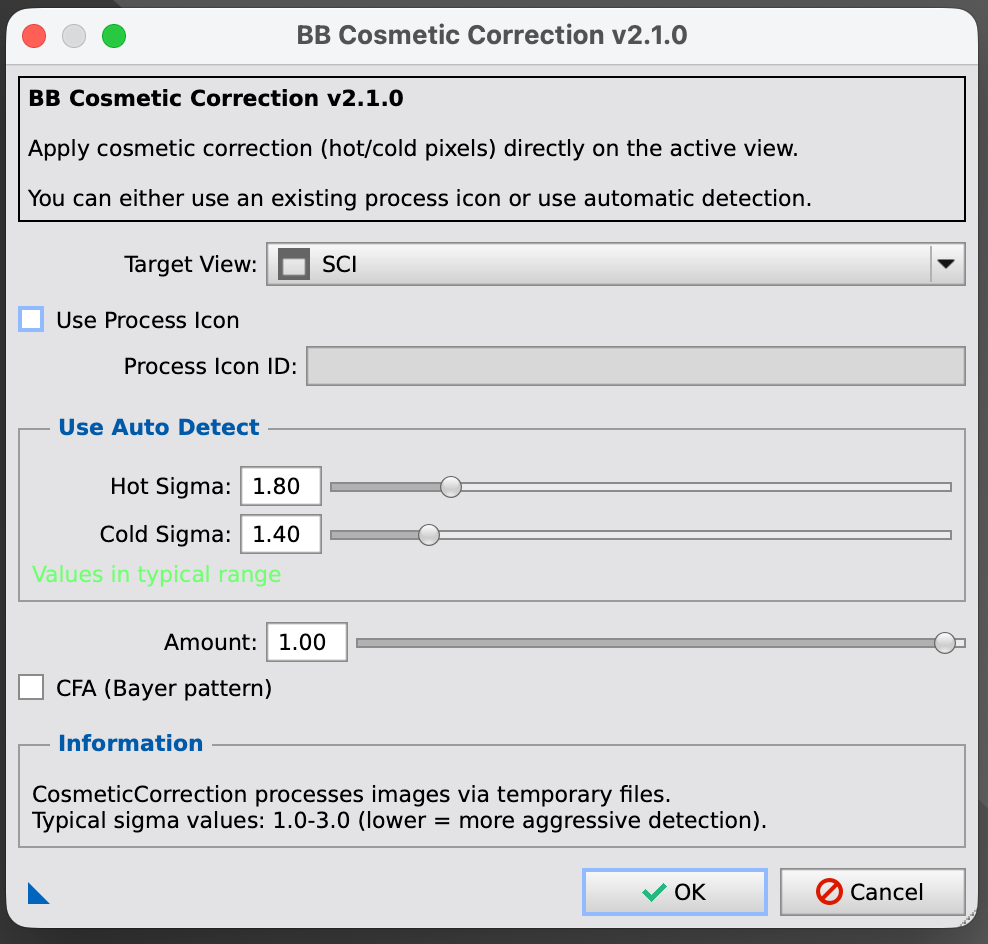
Key Features
- Direct View Processing: Apply corrections on open images without file export.
- Auto-Detection: Automatic hot/cold pixel detection using sigma thresholds.
- Real-time Validation: Visual feedback shows when values are outside typical ranges.
- Process Icons: Save configurations for reuse (triangle button).
- CFA Support: Works seamlessly with Bayer pattern images.
How It Works
Since PixInsight's CosmeticCorrection process normally only works in a global context (file-based), this script bridges the gap:
- Saves the active view to a temporary file.
- Runs CosmeticCorrection on that file.
- Loads the result back into the original view.
- Cleans up temporary files automatically.
Installation & Usage
Installation
Add the BB-Astro repository in Resources > Updates > Manage Repositories:
https://bb-astro.github.io/BB-Astro_Repository/
Then Check for Updates, apply, and restart. The script appears under Script > BB-Astro. No Python setup needed for this one.
Full walkthrough on the installation page.
Typical Values
- Aggressive: Hot/Cold Sigma = 1.0-1.5
- Moderate: Hot/Cold Sigma = 1.5-2.0 (recommended)
- Conservative: Hot/Cold Sigma = 2.0-3.0